
Indicators / Session Sweep
What it does
Two editions: the free Scanner draws the sessions. Pro adds the sweep signal, suggested entry, stop-loss and take-profit levels, alerts, the trend filter and FVG mode.
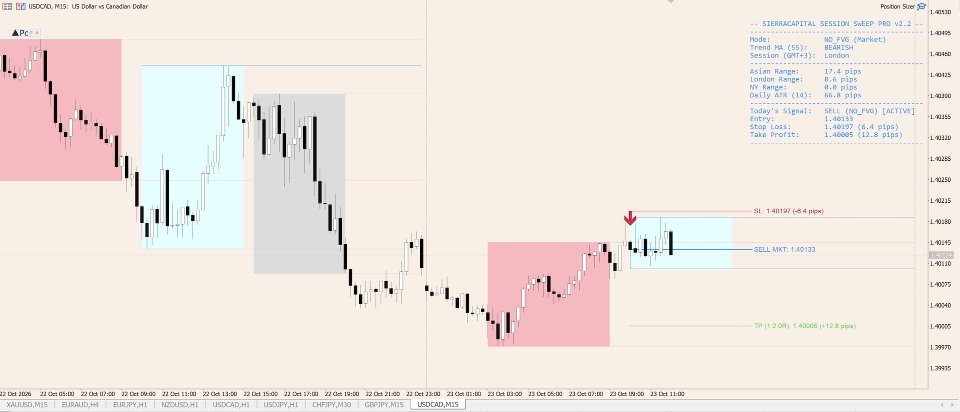
Session Sweep Pro maps the Asian, London and New York trading sessions directly on your chart and alerts you when a session high or low is swept and price comes back inside the range. Entry, stop-loss and take-profit levels are drawn for you, and a compact panel shows what is happening today.
It is a charting and alert tool. It does not open or manage trades.
What you see on the chart
- Session range boxes with high and low lines for Asia, London and New York
- A signal arrow on the sweep candle, with entry, stop-loss and take-profit levels
- An optional trend line (EMA on H4) used as a filter
- A panel with mode, trend, current session, session ranges, daily ATR and today's signal
How a signal works
- 1A session range forms
For example, Asia.
- 2A later session sweeps it
Price takes out the high or low of the earlier range, for example during London.
- 3Price comes back inside
That is the signal. Entry, stop-loss and take-profit are drawn.
Two entry modes
NO_FVG (default): the signal appears when a candle closes back inside the range.
FVG: after the sweep, the indicator waits for a three-candle Fair Value Gap and marks a pullback entry level (50% by default, adjustable).
Alerts
A popup alert with sound, and an optional mobile push notification. By default, one signal per day per session.
Session times and your broker's clock
Enter session hours in GMT; the indicator shows them in your broker's chart time automatically. London and New York follow their own daylight-saving changes. Your broker's time offset is detected automatically and can also be set by hand.
Settings
Six clearly labelled groups: Strategy and Execution, Trend MA Filter, Session Hours (GMT), Session Boxes and Ranges, Trade Visuals and Alerts, and On-Chart Panel. Each session can be switched on or off.
Free or Pro
- What you getScanner
FreePro
49 USD - Asian, London and New York session boxes, with high and low lines✓✓
- On-chart panel with today's sessions✓✓
- Sweep signal arrow on the sweep candle–✓
- Suggested entry, stop-loss and take-profit levels–✓
- Alerts: popup with sound, optional mobile push–✓
- Optional trend filter (EMA on H4)–✓
- Two entry modes, including Fair Value Gap–✓
Requirements and good to know
- MetaTrader 5. Signals and session boxes are drawn on M1 to M30 charts; on higher timeframes only the panel is shown.
- Use one copy of the indicator per chart.
- Signal drawings are shown for the current day only. Earlier days keep their session boxes.
- After your broker changes its clock, past session boxes can be one hour off for a few days.
Important. Session Sweep Pro is a visual analysis aid. Its signals are not trading advice, and no result is guaranteed. Trading leveraged products carries a high risk of loss. Test on a demo account first. Past patterns do not predict future results.